How to Stage Empty Apartment Photos for Better Listings
A practical workflow for staging empty apartment photos and vacant units so buyers can understand layout, scale, and lifestyle faster online.
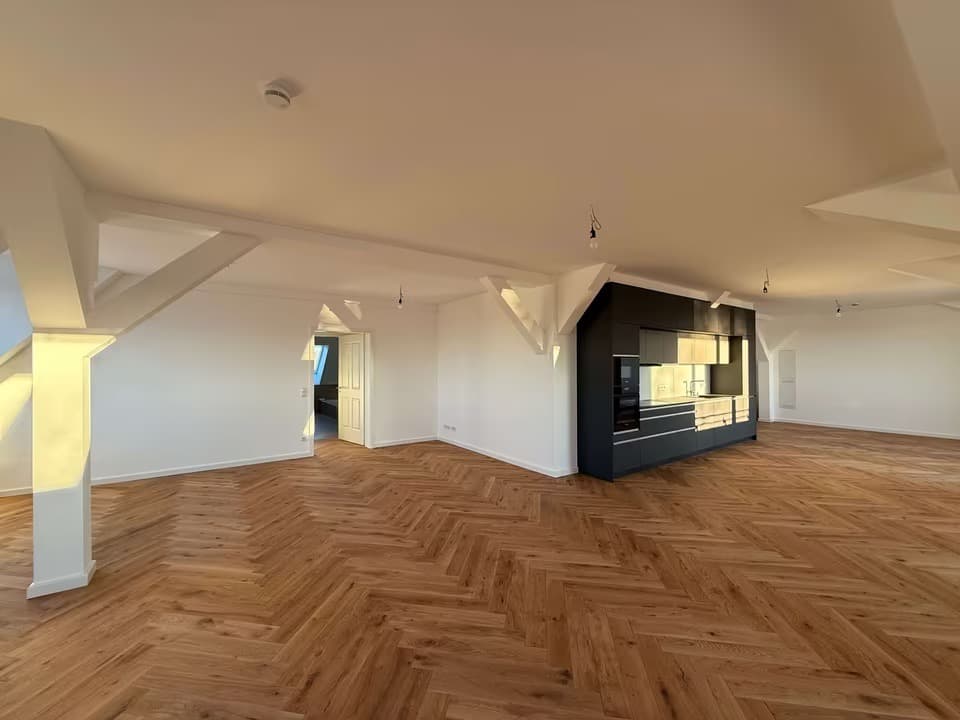
Empty apartment photos often fail for a simple reason: the buyer cannot tell how the rooms are meant to live.
The walls may be clean, the light may be good, and the apartment may feel strong in person, but online the listing still looks cold or undefined. Staging fixes that by adding context, not just decoration.
For agencies, realtors, and leasing teams with recurring vacancies, the practical goal is a repeatable workflow: choose the right source photo, define the room's job, create a believable staged draft, review it for disclosure needs, and publish only if it makes the listing clearer.
Quick Answer
To stage empty apartment photos well:
- start with cleaner source photos,
- define what each room is supposed to communicate,
- stage for the likely buyer or renter instead of for decoration alone,
- keep the result believable enough to support the real listing,
- and disclose virtual staging wherever the MLS, brokerage, or platform requires it.
In This Guide
- How to choose better source photos
- How to define each room's job
- How to stage for the buyer, not just the style
- How to review the final image before publishing
- How to test one vacant unit before scaling the workflow
Start With Better Source Photos
Before you think about furnishing style, make sure the source image gives the staging process a fair chance.
The best inputs usually have:
- Clear room geometry
- Visible floor and wall boundaries
- Balanced natural light where possible
- Minimal motion blur
- Limited clutter or obstruction
If the base photo is confusing, the staged result usually inherits that confusion.
Define the Room's Job
This is the step many teams skip.
Every staged image should answer a buyer question.
For example:
- Is this a calm primary bedroom?
- A family-friendly living room?
- A flexible second bedroom or office?
- A premium open-plan entertaining space?
Without that definition, staging risks becoming decorative instead of commercially useful.
Stage for the Buyer, Not Just the Style
A good-looking room is not automatically a useful listing image.
The staging direction should help the buyer understand:
- who the apartment is for,
- how the room might be used,
- and what market level the property belongs to.
The staging direction should match:
- Likely buyer segment
- Likely renter segment if the unit is a rental
- Property price level
- Apartment location and character
- Amount of furnishing the room realistically needs
This is why "more furniture" is not always better. Often, the goal is to make circulation, scale, and room purpose clearer, not to fill every corner.
Keep the Result Believable
The best empty-apartment staging usually feels like a plausible next version of the real room.
That means:
- Preserving framing and perspective
- Avoiding furniture that overwhelms the space
- Using finishes and styling that match the apartment tier
- Keeping layouts functional rather than theatrical
Believability is what makes the staging useful to buyers instead of distracting to them.
If your team needs a repeatable tool rather than a one-off edit, use a workflow built for virtual staging for empty apartments instead of a generic image generator. That keeps the staging direction tied to real listing photos, market fit, and review.
Review the Room Like a Buyer Would
Before publishing, step back and review the image as if you knew nothing about the apartment yet.
Before publishing, ask:
- Is the room's purpose obvious?
- Does the scale feel believable?
- Does the staging fit the apartment's market level?
- Would this make the listing easier to understand at a glance?
- Does the listing need a virtual staging note, MLS label, or brokerage-approved disclaimer?
Those questions matter more than whether every styling detail is trendy.
For compliance-oriented review, compare your planned wording against practical virtual staging disclosure examples and check the broader MLS virtual staging rules guide.
Test One Vacant Unit Before Scaling
If you manage only one empty apartment, a single staged room may be enough to improve the listing. If you manage recurring vacancies, the first room is also a workflow test.
Before paying for higher volume, run one real vacant-unit photo through the process and check:
- whether the staged image keeps the actual room believable,
- whether the buyer or renter can understand the layout faster,
- whether the result fits your market tier,
- whether the review and disclosure steps are easy for the team,
- and whether the same workflow could handle the next unit without starting over.
That is the point where bulk virtual staging or an agency workflow may become useful.
A Simple Checklist Before You Publish
- The room feels understandable at a glance.
- The furniture fits the scale of the apartment.
- The styling matches the likely buyer and price level.
- The image makes the listing clearer, not just prettier.
- Any required virtual staging disclosure has been reviewed before publication.
The Practical Goal
Staging empty apartment photos is not about making every room look luxurious. It is about helping buyers understand the apartment faster and care about it sooner.
If you want to test that on a real vacancy, see how Planua approaches virtual staging for empty apartments, browse more virtual apartment staging ideas, and start with a free draft.
Try It On A Real Listing
Ready to turn empty room photos into listing-ready interiors?
Use this topic on a real listing and see how Planua fits your virtual staging workflow.
Keep Reading
Related virtual staging guides
empty room listing photos
How to Fix Empty Room Listing Photos Without Making Them Misleading
A practical guide to improving empty room listing photos so buyers can understand layout, scale, and lifestyle potential without making the marketing feel misleading.
virtual apartment staging ideas
Virtual Apartment Staging Ideas That Actually Help Empty Listings
Practical virtual apartment staging ideas for empty listings, with tips on room purpose, buyer fit, and believable styling choices that support faster marketing.
California AB 723 virtual staging photos
California AB 723 and Virtual Staging Photos: A Checklist for Real Estate Agents
A practical California AB 723 checklist for real estate agents using virtual staging photos, including original-image access, disclosure, CRMLS steps, and review.